
If you want to sound sharper in voice chat, rotate faster, and stop dying because your teammate said “one jungle” while you were still looking at stairs, learning Mirage callouts is one of the fastest upgrades you can make in CS2.
Mirage is still one of the most played maps in the current competitive season, and that matters because it means these callouts are not just beginner knowledge. They are everyday ranked knowledge. Right now, Mirage is still showing up in the live map pool and in recent event vetoes and match results, so knowing the map language properly is still worth your time this season.
The quick answer
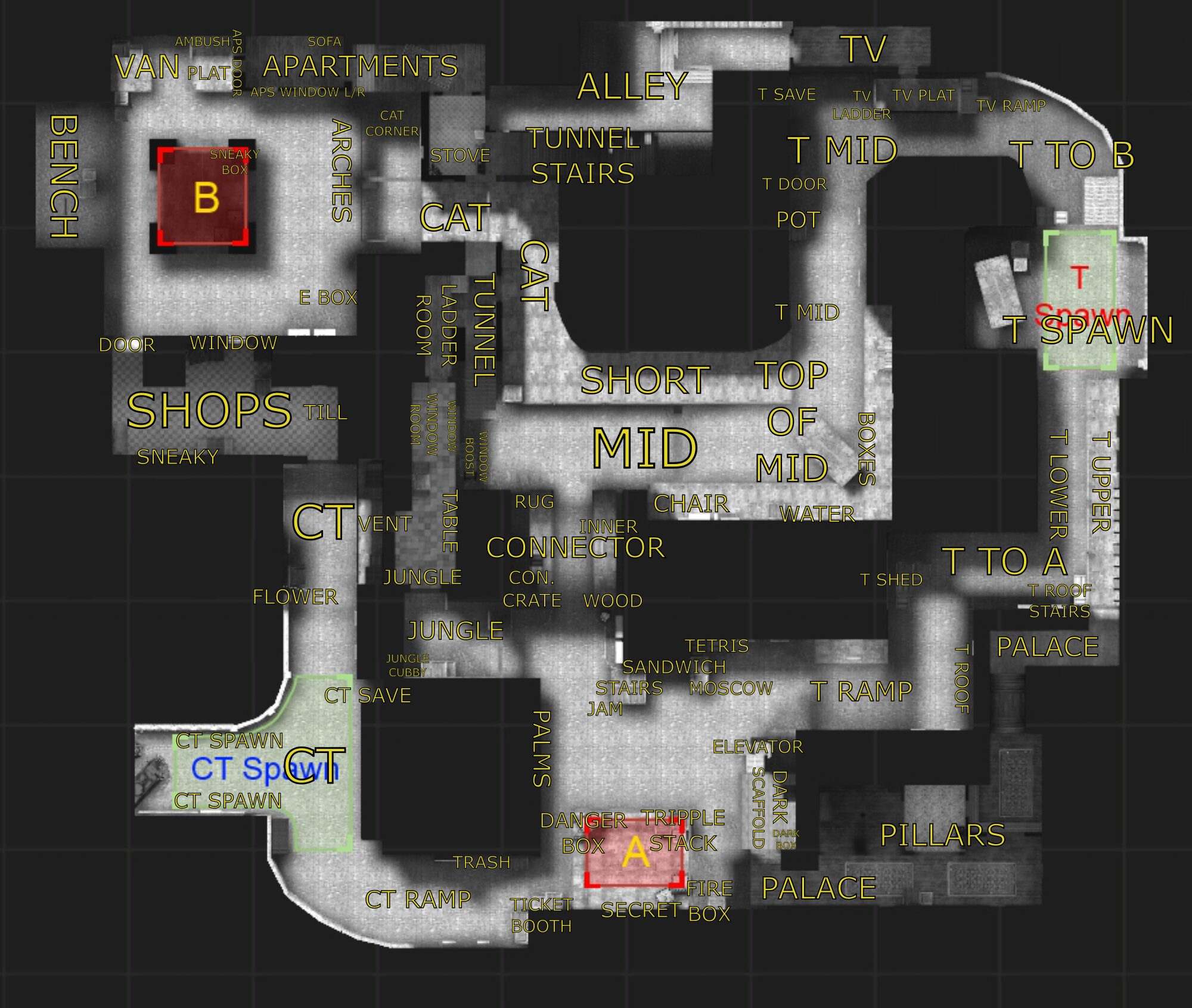
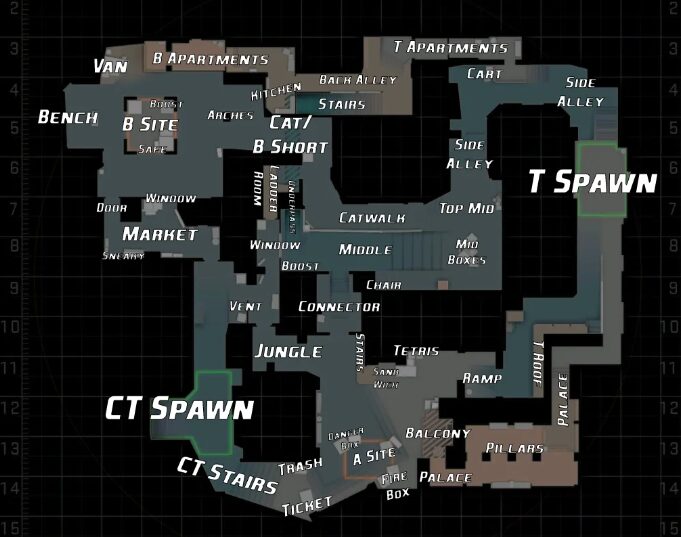
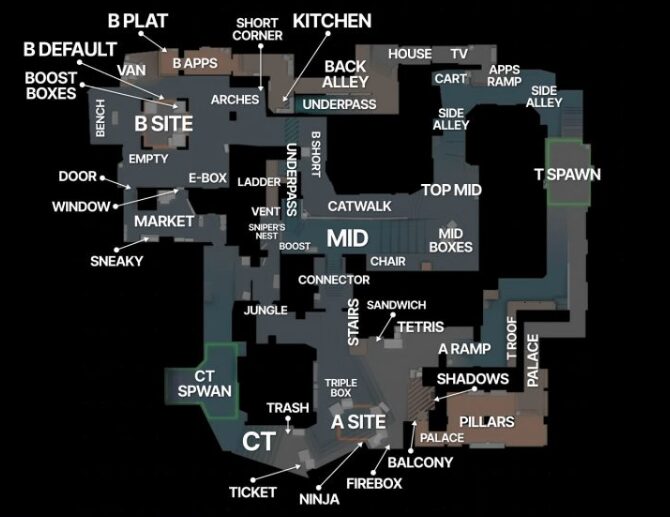
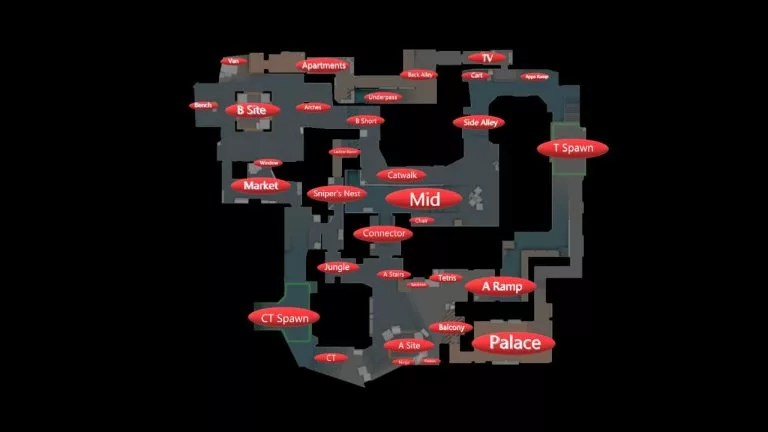
The most important Mirage callouts in CS2 are T Spawn, T Ramp, Palace, A Main, Tetris, Default, Triple, CT, Ticket, Jungle, Connector, Window, Top Mid, Underpass, Catwalk, Apps, Bench, Van, Default B, Market, Short, and B Apartments. If you master those first, you can already communicate clearly in most Mirage rounds.
Core Mirage callouts
| Area | Most used callouts | What players usually mean |
|---|---|---|
| T side start | T Spawn, T Ramp, Palace, A Main | Main terrorist routes into A and early map setup |
| Mid | Top Mid, Mid Boxes, Window, Connector, Underpass, Catwalk | The most important control zone on Mirage |
| A site | Tetris, Default, Triple, Ninja, Firebox, Sandwich, Stairs, Jungle, Ticket, CT | Standard entry, plant, hold, and retake positions on A |
| B side | B Apps, Apartments, Bench, Van, Default, Pillar, Short, Market, Market Door, Kitchen | Main B attack and defense locations |
| Rotations | CT, Spawn, Ladder Room, Connector, Short | How teams move between sites and mid |
Why callouts matter more on Mirage than on a lot of other maps
Mirage punishes vague comms. If someone says “A site” that is usually not enough. On A alone, the enemy could be Tetris, Default, Ninja, Sandwich, Firebox, Triple, Stairs, Jungle, Ticket, or deep CT. On B, “B apps” and “bench” are two completely different fights. On mid, “connector” and “window” change the whole round.
That is why Mirage callouts are not just vocabulary. They are timing and decision making. One clean call can tell your teammate whether to swing, rotate, smoke, flash, or save.
Step 1: Learn the T side start of Mirage first
Start simple. Before you even think about advanced names, lock in the routes you use at the beginning of rounds.
T Spawn is where the terrorist side begins.
T Ramp is the main path leading up toward A site.
Palace is the upper hallway that opens above A site.
A Main is often used casually for the general A approach, especially around ramp pressure.
Top Mid is the upper central lane that opens up once you leave spawn toward middle.
Underpass is the lower path connecting T side toward connector and short.
B Apartments, often shortened to Apps, is the enclosed path toward B.
If you only know these early map callouts, you can already make basic round plans. Things like “three ramp, one palace” or “one underpass, one top mid” immediately make sense to teammates.
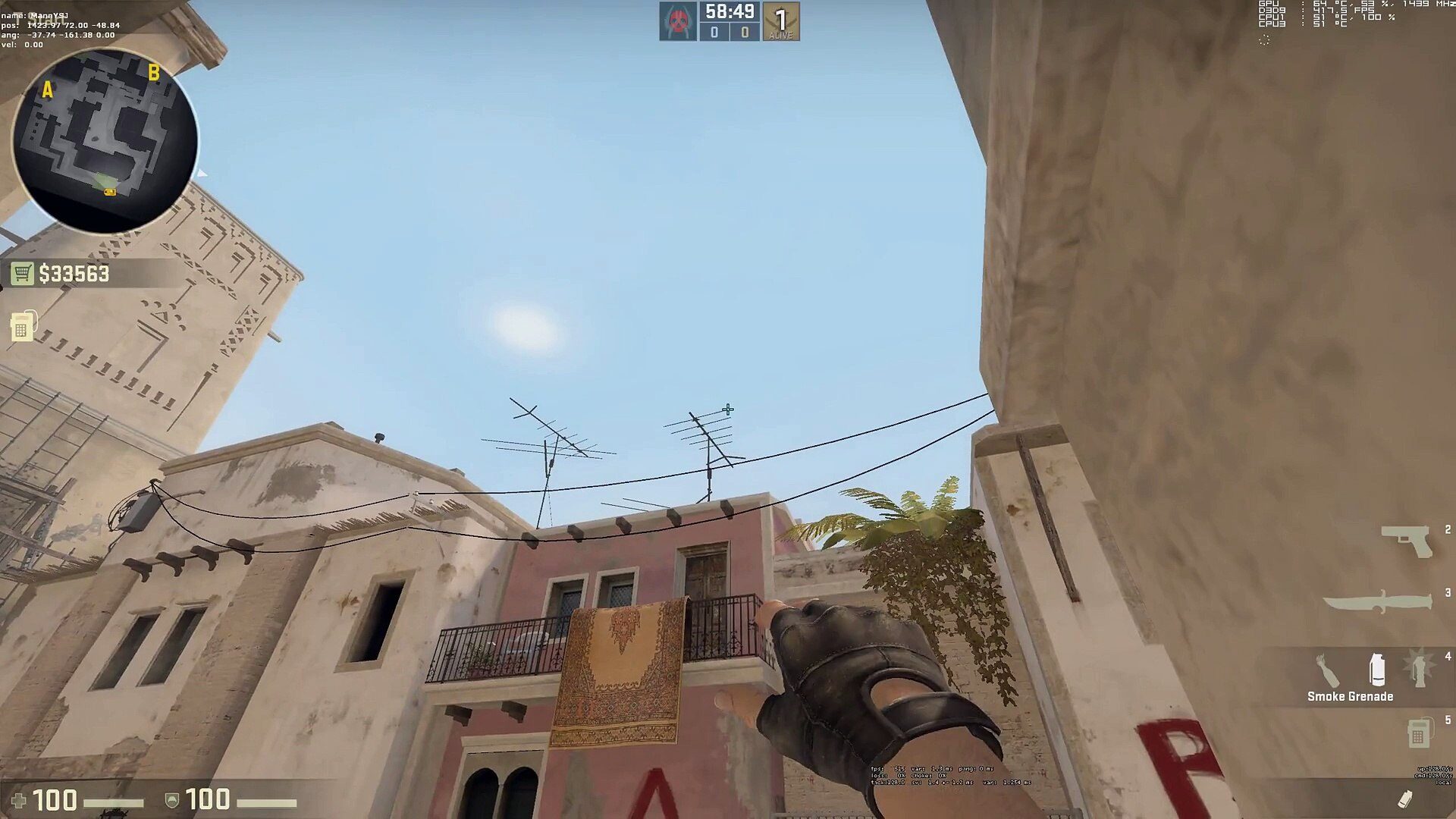
Step 2: Master mid, because Mirage usually starts there
Mid is the heartbeat of Mirage. A lot of rounds are won just by controlling this part of the map.
Top Mid is the open central lane from the terrorist side.
Mid Boxes are the cover boxes near top mid.
Window is the sniper window looking from connector room into mid.
Connector is the passage linking mid into the A side defense.
Catwalk, often called Short, is the raised path from mid toward B.
Underpass is the lower route beneath mid.
Ladder Room is the small room that connects the short and window side area.
If a teammate says “AWP window” or “one connector” and you know exactly where to aim, your reactions become way faster. Mid callouts are the ones I would prioritize first if your goal is ranking up, because Mirage rounds often revolve around whether CTs keep window and connector control or whether Ts break it open.
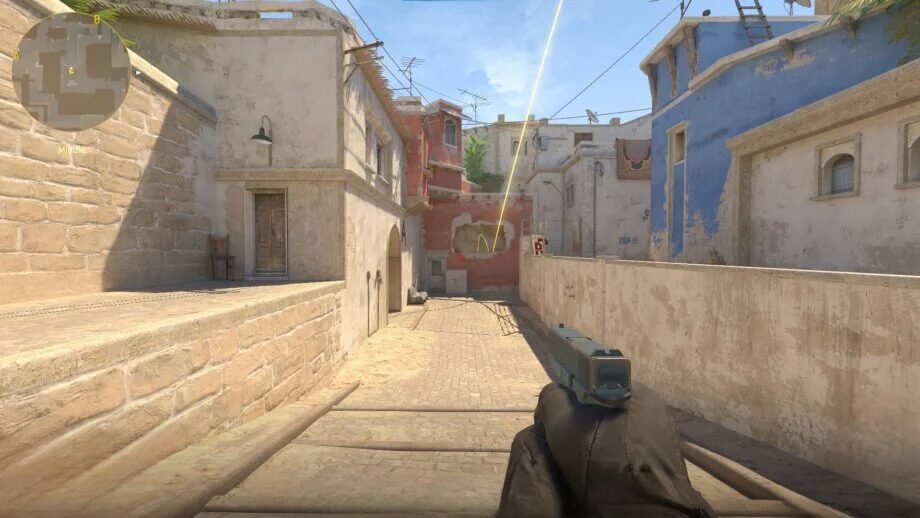
Step 3: Learn A site callouts in the order you actually fight them
A site is where many Mirage rounds feel chaotic, but it becomes much easier when you break it into entry spots, plant spots, and defensive spots.
Entry side callouts on A
Tetris is the stack of boxes near ramp that attackers often hide behind before entering.
Sandwich is the tight space between Tetris and site.
Default is the standard plant zone on A, usually near the boxes in the center front portion of site.
Common CT positions on A
Triple is the triple box stack on site.
Firebox is the small cover near default where defenders or post plant attackers can play.
Ninja is the tucked position behind boxes near default, commonly used in clutches.
Stairs is the staircase between jungle and site.
Jungle is the room and choke between connector and stairs.
Ticket is the ticket booth area near CT spawn.
CT is the spawn side entrance into A, often used as a broad call for defenders coming from spawn.
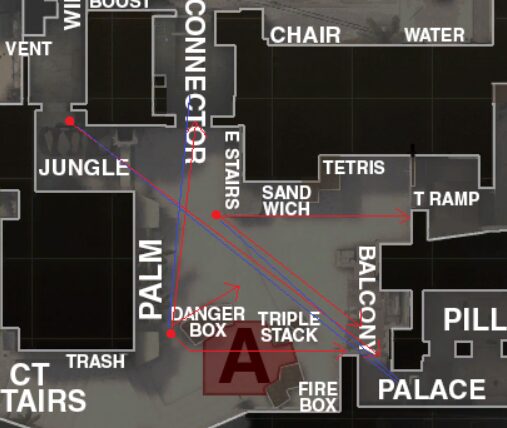
Here is the easiest way to remember A site: attackers usually come from ramp or palace, clear Tetris and Sandwich first, then Default and Triple, then turn toward Firebox, Stairs, Jungle, Ticket, and CT. If you learn the site in that natural order, it sticks much faster than memorizing a random list.
Step 4: Learn B site through the apps route
B is more compact than A, which makes callouts even more important.
B Apartments or Apps is the hallway terrorists use to approach B.
Van is the van on site, one of the classic anchor spots.
Bench is the bench area near the back side of site.
Default B is the common plant position.
Pillar is the central support on site.
Short is the mid to B route, also called catwalk depending on context.
Market is the defending room connected to CT spawn.
Market Door is the doorway from market onto site.
Kitchen is a common casual synonym some players still use for market, though “market” is usually the safer call in CS2.
If you are attacking B, think in layers: Apps first, then Van and Bench, then Pillar and Default, then Market and Short. If you are defending B, the whole round is often about how long the anchor survives before support arrives through Market or Short.
Step 5: Know the “must hear instantly” callouts
Some callouts on Mirage matter more than others because they change rotations immediately.
Window means mid control is under pressure.
Connector means A and mid are linked, so rotators have to be careful.
Jungle usually means A defenders are still strong.
Ticket often means the AWP or a late retake angle.
Short on B means a split might be coming.
Apps means B pressure from the main apartment side.
Palace means A players cannot just stare at ramp.
Underpass usually warns of a lurk that can pop out into connector or short.
When you hear those names, you should not just know the location. You should know the danger that comes with it.
Step 6: Use clean voice comms, not novels
The best Mirage comms are short and layered.
Bad comms sound like this:
“He’s over there on the left by the box thing.”
Good comms sound like this:
“One jungle.”
“Two out ramp.”
“AWP window.”
“One underpass coming connector.”
“Bomb default A.”
“One bench, last market.”
That is the level you want. Short, specific, and instantly useful.
Step 7: The easiest order to memorize Mirage callouts
If you are brand new, do not try to memorize thirty names in one sitting. Learn them in this order:
- T Spawn, Ramp, Palace, Apps, Top Mid, Underpass
- Window, Connector, Catwalk, Ladder Room
- Tetris, Default, Triple, Stairs, Jungle, Ticket, CT
- Van, Bench, Pillar, Market, Market Door, Short
That order works because it follows how you naturally experience the map in real matches.

Read More From Daddyskins
- CS2 Premier Season 4: Start Date, Changes & What You Need to Know
- CS2 Premier Season 4 Leaks
- CS2 Premier 4 Skins & Knives – What We Know
- Harlequin & Achroma COLLECTION SKINS In-Game (New CS2 Update)
- CS2 update today full patch notes and changes explained
- IEM Kraków 2026 Stage 1 Preview and Predictions for CS2
- Cache return rumors resurface in CS2
- CS2 Patch Update January 30, 2026
- New CS2 Skins Just Dropped: Season 4 CS2 Skins
- Cheapest Pink CS2 Skins in 2026
- Valentine’s Day CS2 Skins
- Mudryk CS2 Faceit Ban Explained
- Movement Hub for CS2 Workshop Ranked 2026
- CS2 Danger Zone In 2026
- Esports Nations Cup 2026: What ENC Means for CS2
- When is the next CS2 tournament 2026
- IEM Atlanta 2026 CS2 Preview Teams Format Schedule
- Radar & Minimap Settings Guide for CS2
- Kyousuke CS2 Settings: Full Guide [2026]
- CS2 Weekly Drop Reset 2026
- How Does VAC Works in CS2?
- New York Sues Valve Over CS2 Loot Boxes
- Team Vitality Wins PGL Cluj Napoca 2026 in Dominant CS2 Grand Final
- CS2 Pro Crosshairs Codes 2026
- donk CS2 Settings: Full Guide [2026]
- CS:GO Steam Charts Surge After Valve Quietly Adds CS:GO Back to Steam
- CS:GO Is Back on Steam: How to Download CS:GO in 2026
- Inferno Update CS2: What Changed in the Latest Counter Strike 2 Patch
- CSFloat Item Cannot Be Inspected Due to CS2 Bug (Fix Guide)
- X-Ray Scanner for Cases Introduced in CS2 in Germany
- CS2 Cases Getting Banned? What the New X-Ray Scanner Update Means
- How Do Professionals Trade CS2 Skins?
- Cheapest Red Skins in CS2 (2026)
- CS2 Bunny Hop Commands 2026
- CS2 Cases Banned
- Best CS2 Prop Hunt Servers (2026 List)
- Animgraph 2 Beta CS2 Update April 2026 What Changed
- Cheapest Purple Skins CS2 (2026 List)
- Top Best Cheap CS2 Gloves Under $100 Right Now
- Top CS2 Cases to Open in 2026
- CS2 Viewmodel Settings Guide: How to Find Your Perfect Viewmodel
- PGL Bucharest 2026 CS2: Full Tournament Guide
- How to 1v1 in CS2 Complete Guide (2026)