
If you’ve been opening cases in Counter-Strike for a while, you’ve probably asked yourself at some point:
“How many CS2 cases have I actually opened?”
Maybe you’ve hit a knife. Maybe you’ve spent way more than you expected. Or maybe you’re just curious how deep you’ve gone into the case-opening rabbit hole.
The problem is, CS2 doesn’t make this easy.
There’s no built-in stat, no counter, and no simple “you opened X cases” screen. But the data does exist you just need to know where to look.
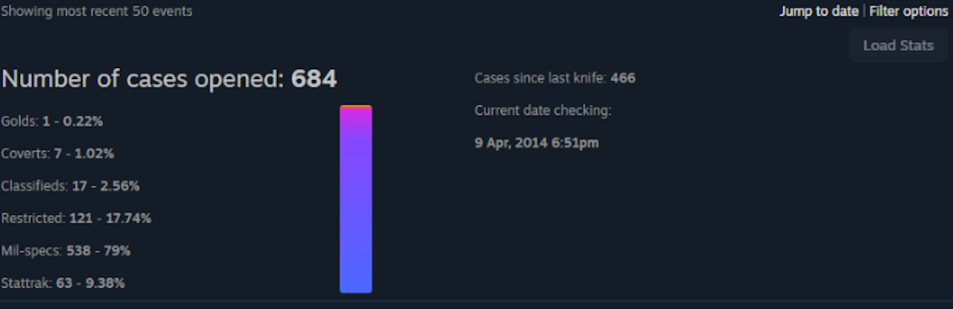
Can You See How Many Cases You’ve Opened in CS2?
Short answer: yes… but not directly.
Valve does not show your total case openings inside the game. There’s no official stat for it like kills, hours played, or rank.
However, every case you open is still recorded in your Steam data, which means you can track it manually or with tools.
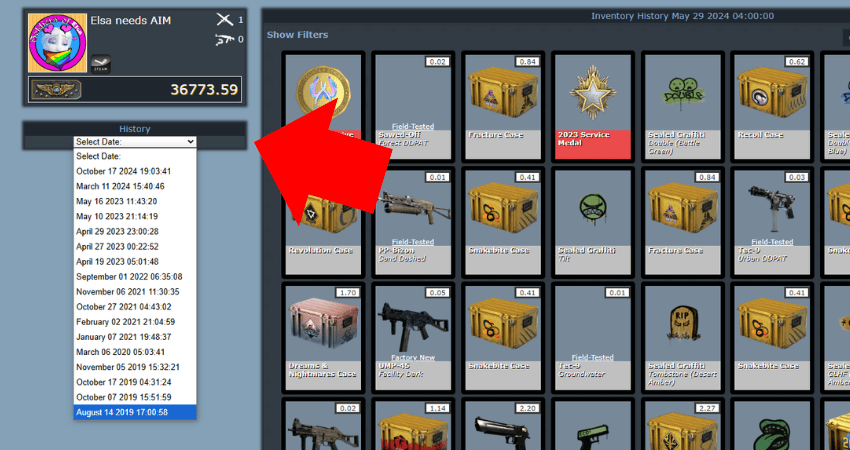
Method 1: Check Your Steam Inventory History (Most Accurate)
This is the most reliable way to see exactly how many cases you’ve opened.
Every time you open a case, Steam logs it as a transaction.
How to do it:
- Open Steam
- Go to your Profile → Inventory
- Click More → View Inventory History
- Filter by Counter-Strike 2
- Search for:
“Unlocked a container”
Each entry = one case opened
Steam records every case opening event, so counting these entries gives you your total.
This method is completely safe and accurate, but if you’ve opened hundreds or thousands of cases, it can take a while.
Method 2: Estimate Using Your Steam Spending
If you don’t want to scroll forever, there’s a faster way to estimate.
Every case requires a key, and keys have a fixed price.
Here’s the idea:
- Go to your Steam account details
- Find your total money spent on CS2
- Divide by the price of a key (around $2.49)
That gives you a rough estimate of how many cases you’ve opened.
It’s not perfect because:
- You may have bought skins directly
- You may have gotten free case drops
But it’s a solid ballpark number.
Method 3: Use a CS2 Case Tracker (Easiest Method)
If you want the cleanest experience, this is the best option.
There are tools that automatically scan your Steam inventory history and calculate everything for you.
These tools can show:
- Total cases opened
- Profit or loss
- Most opened case
- Rare drops (knives, gloves, reds)
Some tools even visualize your stats and track your opening sessions over time.
Most of them work by reading your inventory history, not modifying your account, which makes them safe as long as you use trusted ones.
Why CS2 Doesn’t Show Case Stats
This is something a lot of players don’t realize.
CS2 tracks your data, but Valve doesn’t display it publicly. That’s likely because case opening sits in a weird space between gameplay and spending.
Opening cases involves:
- Real money
- Random outcomes
- Items with real-world value
That’s why many countries even classify it as a form of gambling, especially since skins can be worth thousands of dollars.
So instead of highlighting those numbers, Valve keeps them hidden in the backend.
Final Thoughts
There’s no simple “case counter” in CS2, but your data is there.
If you want the exact number, your Steam inventory history is the best method. If you want speed, use a tracker. If you want a rough idea, estimate your spending.
Either way, once you see the number, you’ll probably look at case openings a little differently.
And if you’re opening cases on DaddySkins instead, at least you know exactly what you’re getting into 😉

Read More From Daddyskins
- 100 Thieves CS2 is back and the roster is now complete
- RYU CS2 Player Profile & Biography
- CS2 Bunny Hop Command
- SpotGuesser CS2 Guide (Spotguessr)
- BLAST Bounty Winter 2026 Schedule, Prize Pool, and Streams
- Aurora CS2 Team, Players and Stats
- Monte CS2 Team Roster Players Results and 2026 Outlook
- CS2 Premier Season 4: Everything You Need to Know
- CS2 Sticker Crafts of 2026 Best and Cleanest Craft Ideas
- CS2 Update 2026: Train Out, Anubis In, and Why This Week Matters
- CS2 Premier Season 4: Start Date, Changes & What You Need to Know
- CS2 Premier Season 4 Leaks
- CS2 Premier 4 Skins & Knives – What We Know
- Harlequin & Achroma COLLECTION SKINS In-Game (New CS2 Update)
- CS2 update today full patch notes and changes explained
- IEM Kraków 2026 Stage 1 Preview and Predictions for CS2
- Cache return rumors resurface in CS2
- CS2 Patch Update January 30, 2026
- New CS2 Skins Just Dropped: Season 4 CS2 Skins
- Cheapest Pink CS2 Skins in 2026
- Valentine’s Day CS2 Skins
- Mudryk CS2 Faceit Ban Explained
- Movement Hub for CS2 Workshop Ranked 2026
- CS2 Danger Zone In 2026
- Esports Nations Cup 2026: What ENC Means for CS2
- When is the next CS2 tournament 2026
- IEM Atlanta 2026 CS2 Preview Teams Format Schedule
- Radar & Minimap Settings Guide for CS2
- Kyousuke CS2 Settings: Full Guide [2026]
- CS2 Weekly Drop Reset 2026
- How Does VAC Works in CS2?
- New York Sues Valve Over CS2 Loot Boxes
- Team Vitality Wins PGL Cluj Napoca 2026 in Dominant CS2 Grand Final
- CS2 Pro Crosshairs Codes 2026
- donk CS2 Settings: Full Guide [2026]
- CS:GO Steam Charts Surge After Valve Quietly Adds CS:GO Back to Steam
- CS:GO Is Back on Steam: How to Download CS:GO in 2026
- Inferno Update CS2: What Changed in the Latest Counter Strike 2 Patch
- CSFloat Item Cannot Be Inspected Due to CS2 Bug (Fix Guide)
- X-Ray Scanner for Cases Introduced in CS2 in Germany
- CS2 Cases Getting Banned? What the New X-Ray Scanner Update Means
- How Do Professionals Trade CS2 Skins?
- Cheapest Red Skins in CS2 (2026)
- CS2 Bunny Hop Commands 2026
- CS2 Cases Banned