Last checked: October 24, 2026
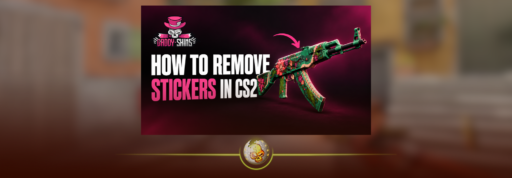
To remove a sticker in CS2, open your Inventory, select the weapon, choose Scrape Sticker, select the sticker, and press Remove Sticker. Confirming removal permanently destroys that sticker. It does not return to your inventory.
If you only want a worn appearance, use the scrape slider instead. These are separate controls, so you do not need to repeatedly scrape a sticker just to get rid of it. store.steampowered.com
How to Remove a Sticker in CS2
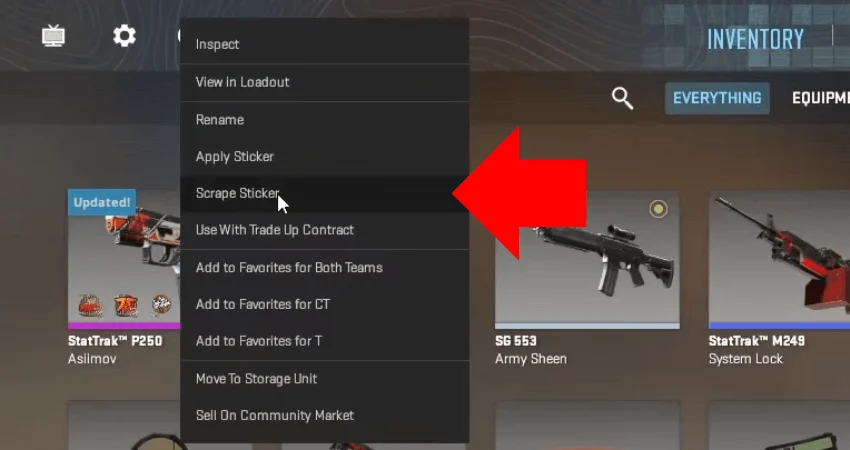
- Open Inventory from the CS2 main menu.
- Select the weapon with the unwanted sticker and open its item menu.
- Choose Scrape Sticker.
- Select the sticker you want to remove from the row beneath the weapon.
- Click Remove Sticker.
- Read the warning and confirm only if you want that sticker permanently deleted.
Check the selected sticker before confirming, especially on weapons with several matching designs.
Valve’s official sticker FAQ confirms that removed stickers cannot be recovered through the removal process. Stickers
How to Scrape Stickers Without Removing Them
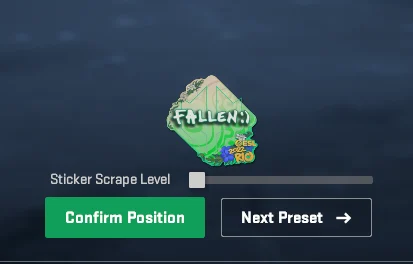
Open the same Scrape Sticker screen and select a sticker. Adjust the Sticker Scrape Level slider, inspect the preview, then confirm with Scrape Sticker when you are happy with the result.
Scraping changes the sticker’s appearance. Depending on its design, wear can fade colors, expose different details, or leave a faint outline.
Previewing a scrape is different from confirming it. Once you apply the change, you cannot restore the sticker’s previous appearance. An applied sticker’s scrape level can only increase.
There is no need to count out five or ten clicks. Valve added precise wear selection and a separate immediate removal option in its October 2, 2024 update.
For examples of intentional scraping, see our CS2 sticker crafts.
Can You Remove a Sticker and Reuse It?
No. A sticker applied directly to a weapon cannot be peeled off, sold separately, or transferred to another gun.
You also cannot reposition an applied sticker. To recreate the design elsewhere, you need another copy. Stickers
What About Sticker Slabs?
A Sticker Slab works differently. It seals a sticker inside a charm that can be attached to a weapon. Breaking the slab returns the enclosed sticker to your inventory and discards the slab.
That does not let you recover a sticker already applied directly to a weapon. It is a separate way to display an unused sticker.
Does Scraping Affect the Skin’s Float?
No. Sticker wear and weapon float are separate attributes. Scraping a sticker does not turn a Factory New skin into Minimal Wear or change the weapon’s float value.
The complete item can still lose resale value if you damage or remove a desirable sticker. An unchanged float does not mean an unchanged price.
Our CS2 float and wear guide explains the weapon’s condition in more detail.
Why Can’t You Remove or Scrape a Sticker?
Check for Trade Protection first if you recently received the weapon through a Steam trade. CS2 items received in trades are protected for seven days. You can equip them during that period, but you cannot modify them, which blocks sticker scraping and removal.
Check the item’s protection status and wait for it to expire. A restriction on selling or trading is not automatically the same as a restriction on modifying an item. Our CS2 trade restrictions guide explains the differences.
If the weapon is unrestricted, return to the main Inventory and reopen its item menu. A nearly invisible sticker may also be heavily scraped rather than fully removed. Stickers
Check the Craft Before Deleting a Sticker
Before removing an unfamiliar sticker, identify its exact name and finish. An older tournament sticker could make the weapon interesting to a collector, even if you dislike how it looks.
Its standalone price is not automatically the premium it adds to the weapon. Check comparable crafts, and use our guide to how stickers affect CS2 skin value before deciding. daddyskins.com
If the sticker has no value to you and you want it gone, use the removal control. If you want to preserve a particular scraped design, stop at the preview and check it carefully before committing.