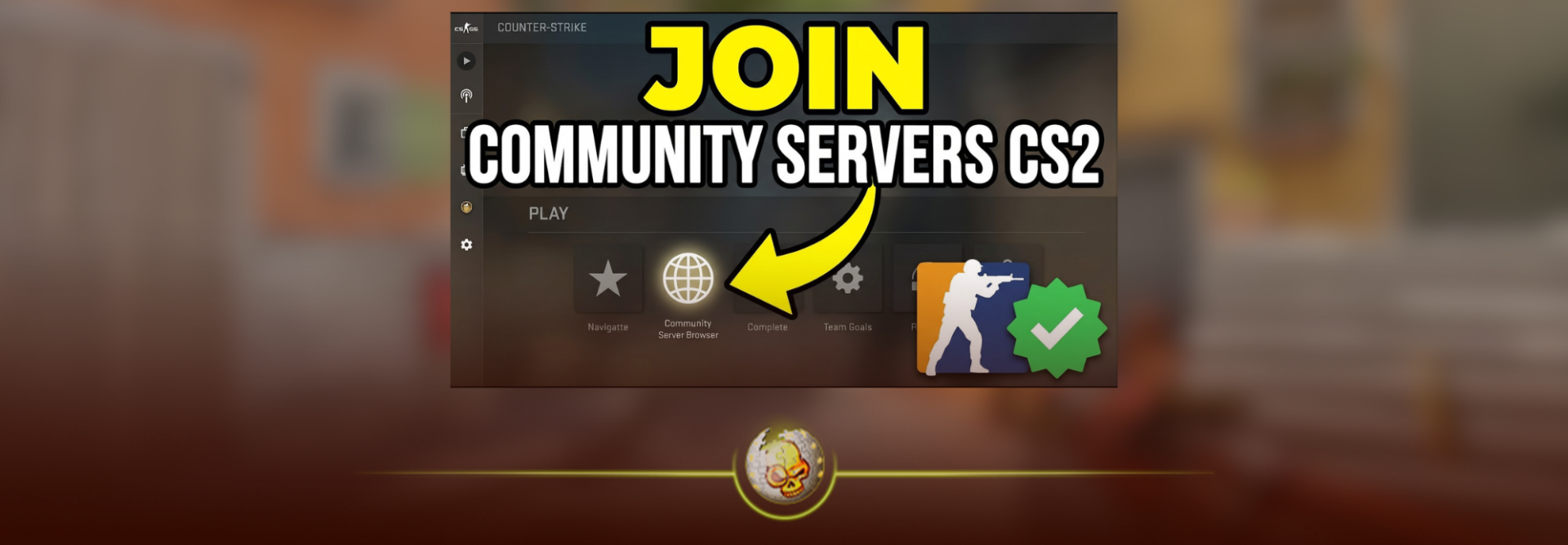
CS2 community servers are where Counter-Strike gets weird, competitive, creative and sometimes way more useful than normal matchmaking.
You can jump into a Deathmatch server for ten minutes before Premier, grind Retakes, learn how to Surf, practice 1v1s, test skins you do not own or spend an entire night playing a custom mode that barely feels like Counter-Strike anymore.
The problem is finding the right server.
This guide explains how CS2 community servers work in 2026, how to find and join them, and which types of servers are actually worth trying.
What Are CS2 Community Servers?
CS2 community servers are privately operated Counter-Strike 2 servers rather than matches hosted through Valve’s normal Premier or Competitive matchmaking.
Server owners can change maps, rules, plugins and game modes, which is why community servers can offer experiences you cannot normally find in regular CS2.
Popular examples include:
- Deathmatch
- Retakes
- Surf
- KZ
- Bhop
- 1v1 Arenas
- Aim training
- Skin inspect servers
- Zombie Escape
- Jailbreak
- Custom maps
Some are built entirely around improving at competitive CS2. Others are just there to have fun.
That variety is what has kept community servers such a big part of Counter-Strike.
How to Find CS2 Community Servers
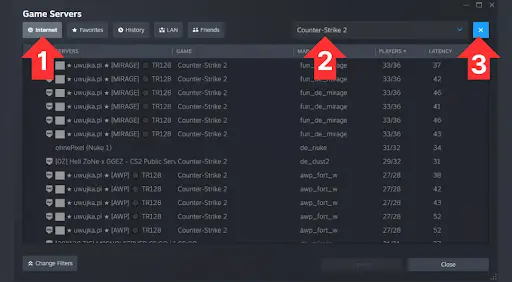
The easiest place to start is the Community Server Browser.
Open CS2, go to Play and select the option for Community Servers.
Depending on your display setup, the browser may appear through Steam’s interface or Steam Overlay. Valve specifically updated the browser to open through the Steam Overlay when CS2 is running in fullscreen exclusive mode. Steam Store
Once the browser opens, you can search and filter servers by things like:
- Server name
- Map
- Number of players
- Latency
- Game mode
Searching terms such as surf, retake, deathmatch, kz or 1v1 is usually much faster than scrolling through everything.
What Should You Look For?
Do not automatically join the server with the most players.
Look for:
Low ping: A nearby server will normally feel much better than a packed server on the other side of the world.
Active players: Completely empty servers are not much use for Deathmatch or Retakes.
The correct mode: Some server names contain several keywords even though they mainly run one mode.
Good moderation: Community servers are run independently, so the experience can vary dramatically between networks.
Stable performance: If players are rubber-banding or the server constantly stutters, find another one.
Server popularity also changes by region and time of day, which is why a permanent list of the “10 best CS2 servers” can become outdated surprisingly quickly.
How to Join a CS2 Server With an IP
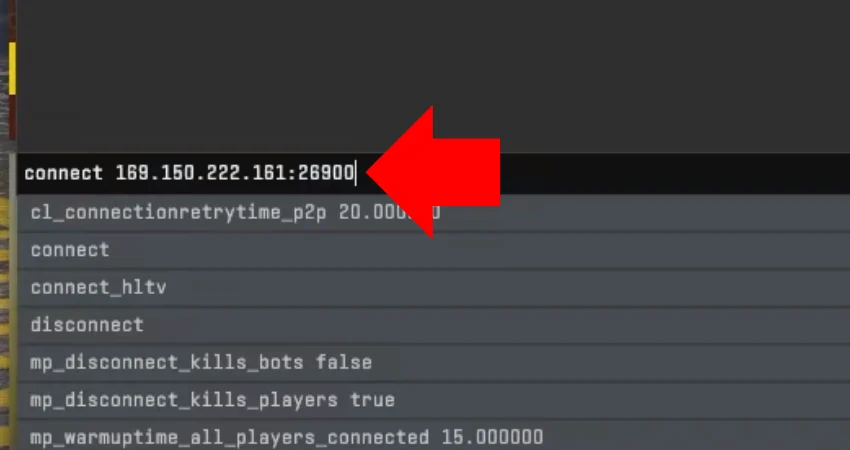
You do not have to use the server browser.
If somebody gives you a CS2 server address, you can connect directly through the developer console.
First enable the console in:
Settings → Game → Enable Developer Console
Open the console using the ~ key and type:
connect SERVER-IP
For example:
connect 123.123.123.123:27015
Then press Enter.
Direct connecting is useful if a server does not appear properly in the browser or if you already know exactly where you want to play. There have continued to be reports from server operators in 2026 of functioning CS2 servers not appearing properly in the browser even though direct connections still work. GitHub
If your browser itself is giving you problems, DaddySkins also has a dedicated guide to fixing CS2 community servers not showing up. CS2 server browser not working guide
Best Types of CS2 Community Servers
There is no single “best” CS2 server because each mode is useful for something different.
Deathmatch Servers
If you want to warm up your aim, start here.
Community Deathmatch servers normally give you constant fights with very little downtime. Some servers also offer rifle-only, pistol-only or headshot-focused modes.
They are useful for working on:
- Crosshair placement
- First-bullet accuracy
- Spraying
- Flicking
- Weapon familiarity
If you want a deeper breakdown of the mode, read our CS2 Deathmatch guide. CS2 Deathmatch guide
Retake Servers
Retake servers repeatedly put players into one of the most important situations in Counter-Strike: the bomb is already planted.
One team holds the site while the other has to retake it.
Instead of waiting through an entire match to get a few post-plant situations, you can practice them over and over again.
Retakes are especially useful for:
- Clearing bombsites
- Trading teammates
- Post-plant positioning
- Utility usage
- Clutch situations
If Deathmatch trains your shooting, Retakes add more actual round decision-making.
CS2 Surf Servers
Surf barely feels like normal Counter-Strike.
Instead of fighting players, you move along angled ramps while controlling your speed and direction in the air.
It takes a while before it starts feeling natural, but that is part of the appeal.
DaddySkins has a full beginner guide explaining how to Surf in CS2 if you want to learn the movement first. How to Surf in CS2
KZ and Bhop Servers
KZ and Bhop servers are for players who like movement more than shooting.
KZ focuses on climbing and completing difficult movement courses.
Bhop focuses on chaining jumps together while maintaining speed.
Both can get brutally difficult once you move beyond beginner maps, and many servers use timers and personal records to turn them into their own competitive game.
1v1 Servers
Sometimes you do not need ten players, utility and rotations.
You just need somebody standing on the other side of the map.
CS2 1v1 servers repeatedly put players into small aim duels using rifles, pistols or AWPs.
They are great for practicing:
- Peeking
- Counter-strafing
- First-shot accuracy
- Pistol duels
- Raw confidence
We also have a complete guide explaining how to 1v1 in CS2, including private matches and alternative ways to practice. How to 1v1 in CS2
CS2 Skin Inspect Servers
This is one of the coolest uses of community servers if you are into skins.
Skin inspect servers let you temporarily equip and view cosmetics you do not actually own.
That means you can see how a knife animation feels, compare glove combinations, inspect different patterns or check a sticker craft under actual CS2 lighting before spending money.
The items are only being previewed on that server. They are not added to your Steam inventory.
We have a separate walkthrough covering CS2 skin inspect servers and how to test any skin. CS2 Skin Inspect Servers guide
Workshop and Custom Map Servers
Community servers are also one of the easiest ways to experience maps outside CS2’s normal matchmaking pool.
That can include:
- Aim maps
- Movement courses
- Custom competitive maps
- Minigames
- Zombie maps
- Hide-and-seek modes
- Completely original creations
You can also launch many community-created maps yourself through the Steam Workshop. Our guide to playing CS2 Workshop maps with friends explains that process separately. How to Play Workshop Maps With Friends in CS2
What Are HVH Servers in CS2?
You may also see people searching for HVH servers.
HVH usually means hack versus hack. These are unofficial community servers built around players using cheats against one another.
They are completely different from normal practice or casual community servers and are not something we recommend using.
If your goal is better aim, movement or mechanics, Deathmatch, Retakes, 1v1, Surf and KZ servers give you plenty to do without relying on cheats.
Community Servers vs Official CS2 Matchmaking
They serve different purposes.
Official matchmaking is better when you want:
- Premier
- Competitive ranks
- Standard CS2 rules
- Structured 5v5 matches
Community servers are better when you want:
- Faster practice
- Custom game modes
- Movement training
- 1v1s
- Custom maps
- Skin testing
- More control over what you play
Most serious players do not really have to choose between them.
You can warm up on a community Deathmatch or Retake server and then queue Premier afterward.
If CS2 itself is not running smoothly, optimizing your CS2 settings before blaming the server is also worth doing. Best CS2 Settings for 2026
CS2 Community Servers Not Showing Up?
Do not panic if the browser looks empty.
First try:
- Clear unnecessary server filters.
- Make sure Counter-Strike 2 is selected in the Steam server browser.
- Refresh the server list.
- Restart CS2 and Steam.
- Make sure your game is fully updated.
- Try connecting directly through the console if you know the server address.
CS2 updates can occasionally cause temporary compatibility problems for community servers, especially servers relying on custom plugins.
If CS2 says your version is outdated, follow our CS2 client needs to update fix before troubleshooting anything more complicated. CS2 Client Needs to Update guide
For a full troubleshooting walkthrough, use our dedicated CS2 server browser fix guide. CS2 Community Servers Not Showing Up guide